
Introducing Our Upgraded Project: Motion Reality
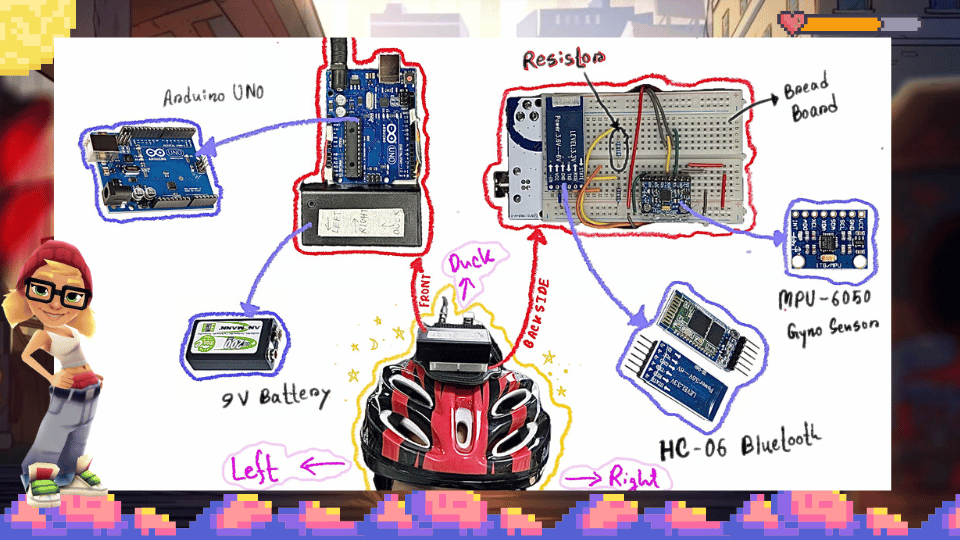
Our new design replaces the old components with more precise Gyro sensors (MPU 6050) and a Bluetooth module (HC-06) to create a wireless setup. This new system works as follows:
- Head Controller: Mounted on a helmet, it uses 3-axis angle detection to manage left/right movements and duck actions.
- Leg Controller: Attached to the leg, it detects jumps based on acceleration data.
In this session, we developed our own client-side Python driver to allow the wireless controller to communicate with a computer without needing an HID-supported Arduino. Powering the Arduino Uno R3, HC-06, and MPU 6050 with a 9V battery, our new design eliminates the lag issues, making it feel much more like a true motion reality controller.
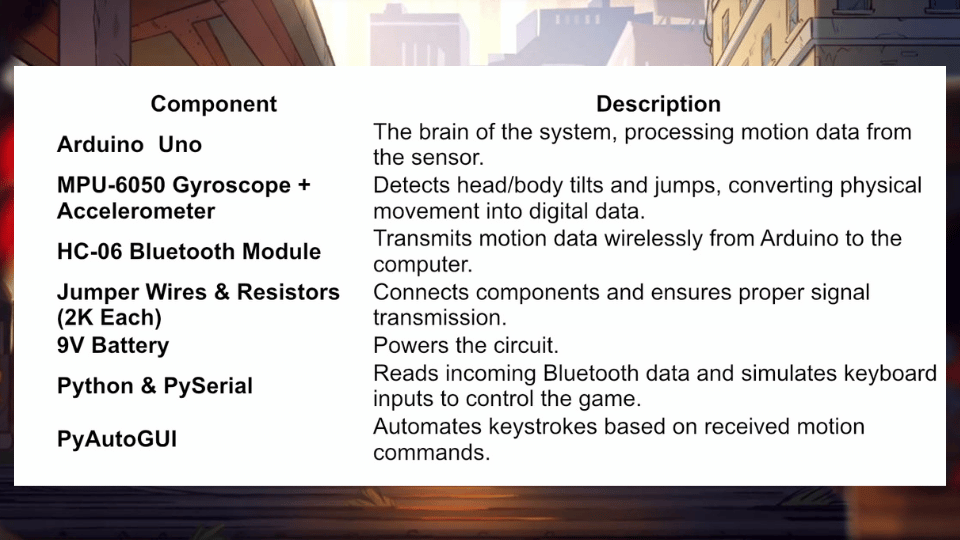
Key Elements In Nutshell
Coding Logics
-Arduino Side: Head Controller
Our head controller uses an MPU6050 sensor to detect head movements and an HC-06 Bluetooth module to send the data wirelessly. Here’s the overview:
Libraries & Setup:
We include libraries for I2C communication (Wire.h), the MPU6050 sensor, andSoftwareSerialfor Bluetooth communication on pins 10 and 11.
We define thresholds for actions (like ducking or turning left/right) based on pitch and roll angles.Sensor Initialization:
In thesetup()function, we start serial communication (for debugging and Bluetooth) and initialize the MPU6050. We configure the sensor’s accelerometer and gyroscope ranges to get accurate readings with reduced noise.Reading & Decision Logic:
In theloop(), we read accelerometer data and calculate the pitch and roll. Depending on these values:- If the pitch is above a certain threshold, we classify it as a “DUCK.”
- If the roll is below or above specific thresholds, it’s marked as “LEFT” or “RIGHT.”
- Otherwise, it outputs “NONE.”
These commands are sent both to the serial monitor (for debugging) and over Bluetooth to PC Client.
-Arduino Side: Leg Controller
The leg controller is similar in structure but focuses on detecting jumps.
Libraries & Setup:
Just like the head controller, we include necessary libraries and set up the Bluetooth module on pins 10 and 11. This setup also initializes the MPU6050 sensor.Jump Detection:
Since the sensor is mounted differently (In Leg), the Y-axis acceleration becomes critical. In theloop(), we check if the Y-axis reading drops below a set threshold. If it does, we interpret it as a “JUMP” action; otherwise, we output “NONE.”
This simple check ensures that when the leg moves rapidly (as in a jump), the command is captured and sent over Bluetooth to the PC Client.
-Computer Side: Python Client Driver (PC Client)
Our Python script serves as the bridge between the wireless controllers and the computer’s keyboard input.
Serial Communication:
We open two serial connections (one for each controller) using thepyseriallibrary. The script listens continuously for incoming commands from the Arduino setups.Mapping Commands to Keystrokes:
When a command like “LEFT”, “RIGHT”, “DUCK”, or “JUMP” is received, the script uses thepyautoguilibrary to emulate the corresponding arrow key press.
To avoid repeated keystrokes, the code keeps track of the previous command and only triggers a key press when there’s a change.Client-Server Integration:
This approach lets us bypass the need for an HID-supported Arduino or Servo Motors, making our wireless controller more flexible and responsive.
 This shift not only addresses the latency problem but also opens up opportunities for more fun and engaging gameplay. While our initial ultrasonic setup provided valuable insights, the new wireless, gyro-based design marks a significant step toward our goal of a fully finished and innovative motion controller. By combining sensor data from the Arduino with Bluetooth communication and a Python-driven client, we’re able to transform physical movements into digital commands for gaming.


