
After successfully completing Week 6-S2, we concluded our Arduino project and the class taught by Professor Judhi. This week, we were introduced to Professor Sameer K., who will be teaching the class from now onward. In the coming days, we will explore topics related to media and artificial intelligence.
This week, we will atempt to do edit a photo of a picture provided and owned by Professor Sameer K.
Activity 1 : Image Edit
Original Photo [Professor Sameer K.]
Format JPG, Original Content, No Compression

Edited Photo [Owned by Professor Sameer K. , Edited By Arafat]
Format PNG, Edited Photo, Compressed (Loseless)
Edits: Cropped, Color Balance, Filter, Exposure, Cropped

Activity 2: Changing Eye Colour
A video demonstrating how to change eye color and some few optimization of the image.
Edited Photo
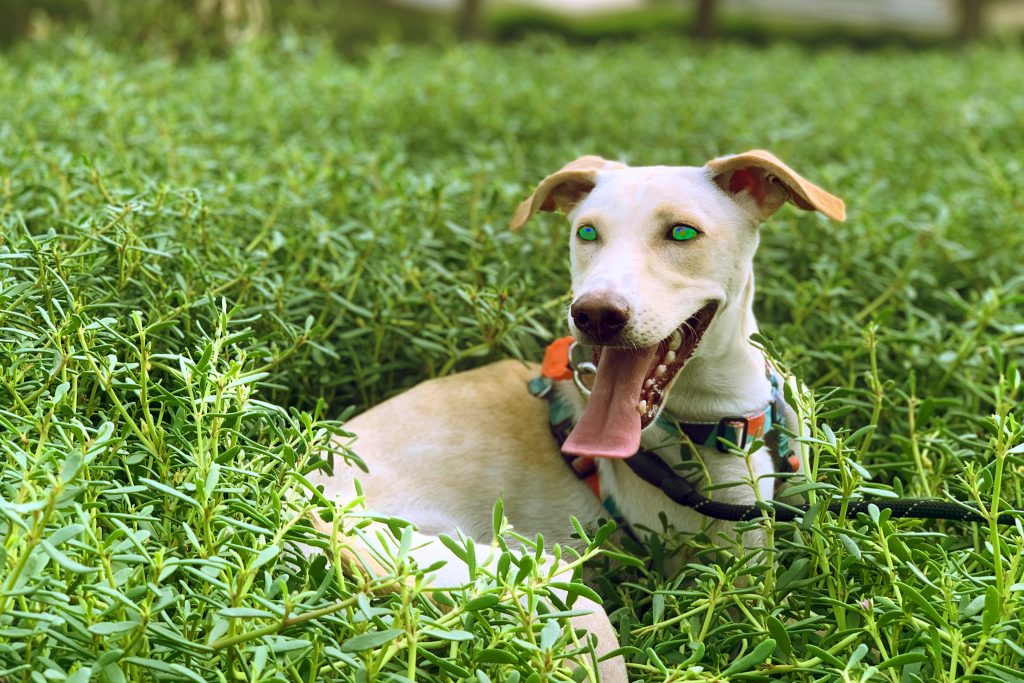
Info: Ownership to this photo is still owned by the original owner even after editing a lot unless explicitly permited to own.
Activity 3: Discoveries
Available image file formats: JPEG, PNG, GIF, TIFF, BMP, SVG, and RAW are commonly used, each varying in image quality, file size, and usage.
Artistic filters applied: Effects such as blur, sharpen, oil painting, sketch, watercolor, mosaic, emboss, and vintage that enhance creativity or visual style.
Colour balance: Adjusting the intensity of colors (red, green, blue) in an image to make it visually pleasing, realistic, or stylistically expressive.
Hue and Saturation:
Hue: The actual color shade (e.g., red, blue, green).
Saturation: Intensity or vividness of that hue—higher saturation means brighter colors; lower saturation means more muted or grey.
Ownership after editing: Even after considerable edits, the original creator typically retains ownership unless rights are explicitly transferred; significant creative edits may grant the editor partial or full rights depending on agreements or copyright guidelines.
Definitions:
Ownership: Legal right to possess, control, and distribute a file or creative work.
Pixels: Tiny squares of color that make up digital images, similar to building blocks.
Binary representation: Method by which digital images and files are stored as sequences of 0s and 1s in computer memory.
Activity 4: Screen Recording
In this activity, I am using MACOS built-in screen recorder to record a video of my screen, showing how to crop photo using photo editing tool.
Activity 5 : Discoveries
Available File Formats:
Audio: MP3, WAV, AIFF, OGG, FLAC
Images: JPEG, PNG, GIF, TIFF, BMP, SVG
Videos: MP4, AVI, MOV, WMV, MKV
Free Ways of Converting Between File Formats:
Online tools: Zamzar, CloudConvert, Online-Convert.com
Software: Audacity (audio), GIMP or Paint.NET (images), HandBrake or VLC (video)
Built-in tools: Some operating systems include built-in converters, like Preview on Mac for images or Voice Recorder on Windows for audio.


